

Haar: a free salon website template where the Reserve button actually books

Search for a salon booking website template and most of what comes back is a design. I opened two of the top results in October 2026. The free LumiereSalon template on Framer "books" through click-to-call and email links. The HomeSalon TNC template on Webflow has a form that, in its own words, "captures a booking request with service, date, time and location, and you confirm." Both look lovely. Neither knows whether Clara is free at 15:30 on Tuesday.
Haar is the other way round. It's a free, MIT-licensed Next.js salon site whose booking is wired to Opencals, the booking and checkout engine we build. If you want a salon site where clients pick a service, a stylist and a time and the slot is really theirs, Haar does that out of the box. If you only want a pretty page with a phone number, one of the design templates is simpler.
Haar is a free salon booking website template (Next.js 15, MIT licence) that takes real bookings through Opencals. Services are priced by hair length, clients can book "any stylist" and see who is free in each slot, the chair is held while they pay, and they can pay by card, Apple Pay or Google Pay, at the salon, or by bank transfer. Clients get an account to reschedule or cancel. The template is free; bookings run on a free Opencals development store for testing, then cost $0.99 each or $14.98 a month for 300 (checked October 2026).
The full setup reference lives in the Haar docs. This page is about what Haar does for a salon, what it costs to run, and who should pick something else.
A salon menu is priced by hair length, so the template is too
A blow dry on a pixie cut and a blow dry on waist-length hair are not the same job, and most booking widgets make you create three separate services to say so. Haar shows one service with "Hair length" choices, and each choice carries its own price, duration and the stylists who do it. The location selector then narrows the menu, the stylists and the times to one salon.
This is the menu the demo store ships with (live demo, checked 28 October 2026). It's seeded data, so treat it as a realistic starting point rather than a price guide:
| Service | Options | From | Duration |
|---|---|---|---|
| Haircuts & Styling | Short, Medium, Long hair | $45 | 30 min – 1 h |
| Blow Dry & Styling | Short, Medium, Long hair | $40 | 30 min – 1 h |
| Hair Coloring | Root touch-up, Partial, Full | $75 | 1 h – 2 h |
| Balayage & Highlights | Partial, Full, Creative | $150 | 1 h 30 – 2 h 30 |
| Color Correction | Basic, Complex, Full correction | $180 | 1 h 30 – 3 h |
| Keratin Treatment | Express, Classic, Premium | $90 | 45 min – 2 h |
| Scalp Therapy | Basic, Deep treatment, Intensive | $50 | 30 min – 1 h |
| Bridal Hair | Classic, Luxury, Couture | $250 | 2 h – 3 h |
Because duration lives on the option, a full balayage blocks 2 h 30 of that colourist's day and a partial blocks 1 h 30. Nobody pads the calendar by hand.
"Any stylist", or the one you always see
Regulars want their stylist. New clients want the earliest slot. Haar serves both on the same page. In "Any stylist" mode, every time slot shows the faces of the stylists who are free at that moment, so the client picks a time first and a person second. Pick a stylist first and the slots narrow to their diary.
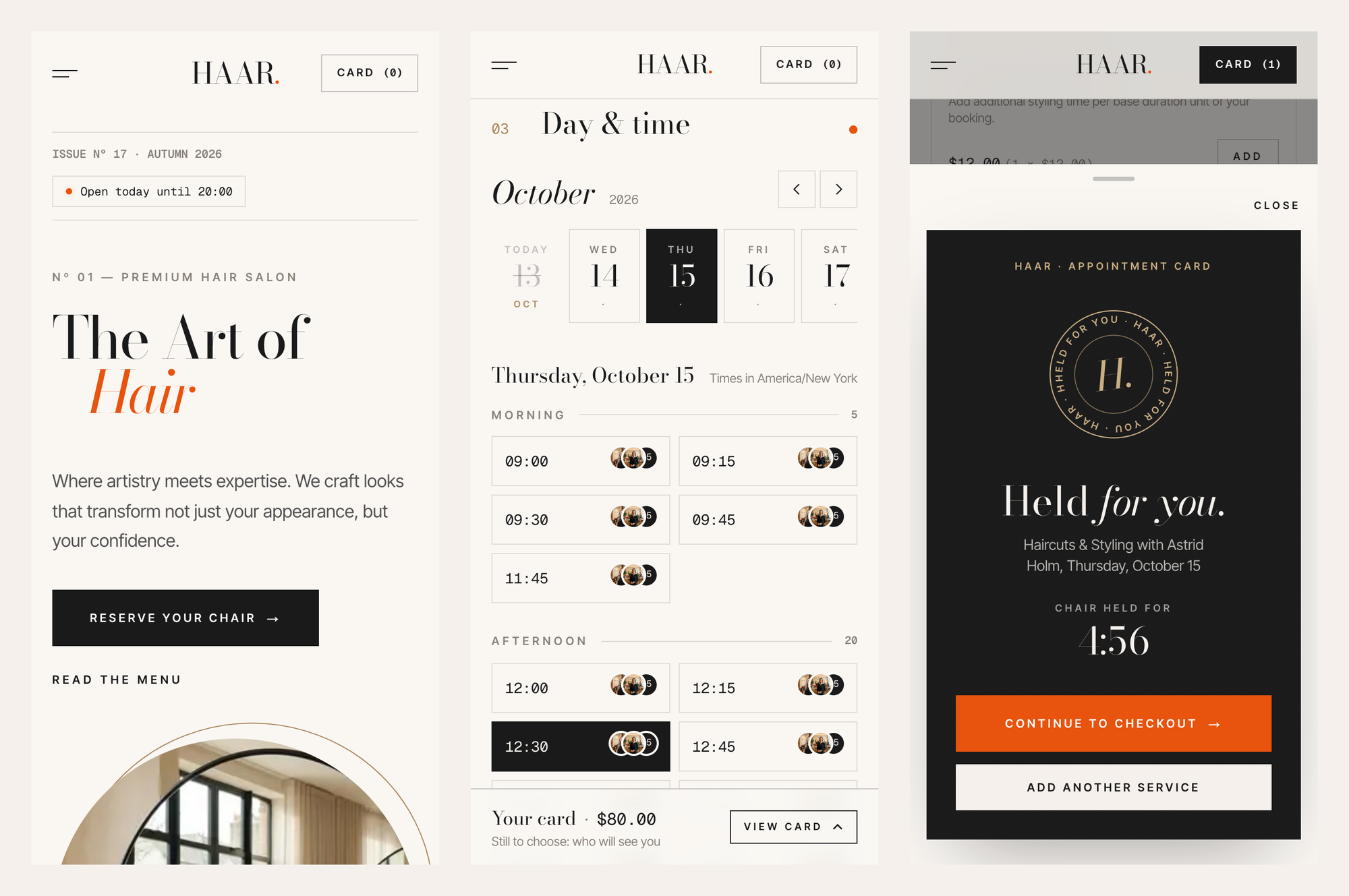
When a client taps Reserve, the card flips to "Held for you" with a countdown (4:56 in the screenshot). That chair is held while they check out, so two people can't both pay for Astrid at 12:30. On a phone, the appointment card turns into a sticky "Your card · $80" bar at the bottom of the screen.
One small feature salons end up using a lot: booking links can carry ?date=, ?staff= and ?location=. Put a link with a stylist's id in their Instagram bio and the booking page opens with them already chosen.
Finishing touches, and the ways a salon actually gets paid
After the time comes a "Finishing touches" step for add-ons. In the demo that's extra styling time at $12, added to the same appointment rather than booked as a second service.
Checkout supports the payment habits salons really have:
- Card, Apple Pay and Google Pay through Stripe, once Stripe is connected to your Opencals store
- Pay at the salon, for clients who'd rather settle at the desk
- Bank transfer
- Free bookings, useful for consultations and patch tests
What I won't promise yet: deposits and no-show fees are in beta in Opencals. If your salon's policy depends on taking a deposit on every colour booking, test that on a development store before you rely on it, or use full card payment at booking for those services.
The confirmation page stamps the card "Confirmed" and gives the client an add-to-calendar file, directions and a "Before your visit" checklist.
Clients rebook from their salon diary, not your DMs
The account area is called "Your salon diary". Clients sign in with a 6-digit code sent to their email (or a password), and links in booking emails sign them straight in. They see the next visit with a countdown, past and upcoming appointments, and their orders as receipts. Reschedule and cancel work within whatever rules you set in your store.
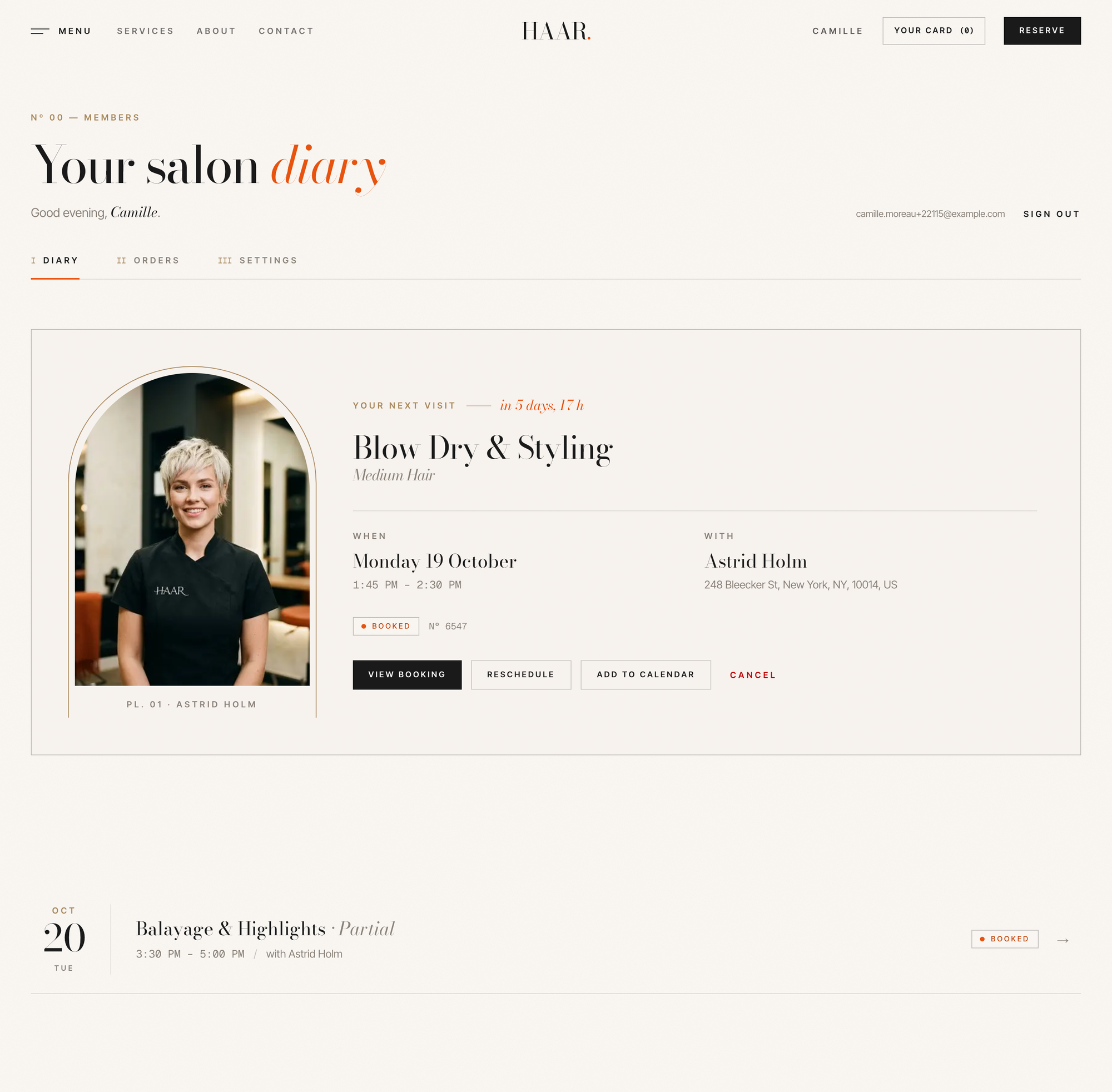
For a salon, this is the screen that removes the "can I move my Thursday?" messages at 11pm.
What running Haar costs a salon with four stylists
The template costs nothing and stays yours under the MIT licence. Bookings run on Opencals. You can build and test the whole site on a free development store: every feature works, there's no card required, but it's test mode and can't take real payments. When you go live, you pick a plan. Prices from opencals.com/pricing, checked 28 October 2026:
| Bookings a month | Elastic ($0.99 per booking) | Custom ($14.98/mo, 300 included, then $0.20) | Custom + client self-service ($14.99/mo add-on) |
|---|---|---|---|
| 60 | $59.40 | $14.98 | $29.97 |
| 200 | $198.00 | $14.98 | $29.97 |
| 400 | $396.00 | $34.98 | $49.97 |
Elastic includes every feature and makes sense in the first weeks or for a seasonal business. Past about 16 bookings a month the Custom plan is cheaper, and a four-stylist salon passes that in its first week. Our pricing page's own "typical salon" setup (base, client self-service and branding) comes to $39.95 a month for 300 bookings.
Two costs sit outside Opencals: hosting the site (Vercel or any Node host bills you directly) and Stripe's card fees if you take card payments.
Who should skip Haar
- A salon that wants a website by Friday and has no one technical. Haar needs someone to deploy it and edit a config file. If that's not you, Opencals gives every store a hosted booking page on yourstore.opencals.com or your own domain, with no code.
- A salon that lives on marketplace discovery. If most new clients find you by browsing Fresha or Booksy, a standalone site won't replace that traffic on day one. Haar is for salons that want their own booking page and their own client list.
- A single chair with one service. A template built around multi-stylist, multi-location booking is more than you need.
For everyone else, especially agencies building sites for salon clients, it's a working booking site you only have to rebrand.
Rebranding Haar for a salon client in an afternoon
Everything salon-specific lives in one file, lib/site-config.ts: name, tagline, logo, the homepage copy, testimonials, team, hours, contact details, footer and social links. Colours and type are CSS custom properties in app/globals.css. Change those two files and Haar becomes your client's salon.
The demo look is editorial: numbered sections, arch-masked photography, line reveals and a pinned "Ritual" sequence. The motion switches off for visitors who set reduced motion on their device.
To run your own copy, create a free development store at app.opencals.com, choose the "HAAR Salon" sample dataset so the site fills with the demo's services and stylists, create a private storefront key, and deploy:
Deploy with Vercel| Variable | What goes in it |
|---|---|
OPENCALS_API_KEY | Your private storefront key (starts with spk_). The template forwards each visitor's IP with it, so rate limits count per visitor |
AUTH_SECRET | Any random string, used to encrypt client sessions |
The Haar docs cover local development, the project structure and the API calls behind each step. If you'd rather have an AI agent do the scaffolding, the Opencals Agent Skills work in Claude Code, Cursor, Codex and Gemini CLI.
Haar live demo
Book a fake balayage and watch the chair get held.
Haar on GitHub
MIT-licensed source. Fork it for a client.
Haar docs
Setup, project structure and the API calls behind it.

Frisor: barbershop template
The same engine with a dark editorial barbershop design.

Hair salon booking software compared
Fresha, Booksy, Vagaro and others, priced for 2026.

Tensile: Pilates studio template
Class timetables, beds left and privates.
Opencals pricing
$0.99 per booking or $14.98 a month for 300.
Frequently Asked Questions
Get started
Ready to transform your service business?
Join 150+ businesses already using Opencals. Start on a free development store with every feature unlocked, and only pay once you go live.